Digital Citizenship Unit Bundle | 8 Units, 27 Days, High School
8-UNIT BUNDLEDIGITAL CITIZENSHIP

Digital Citizenship Unit Bundle

Eight complete units. 27 days of teaching. One download.

Eight classroom-ready digital citizenship units that behave the same way, with nothing to assemble: digital footprint, social media and online safety, cyberbullying and digital drama, misinformation and media literacy, online communication, screen time and digital habits, chatbots and artificial intelligence, and passwords and account security. Every unit starts with a real situation and gets to the rule second. Print the guided notes, open the deck, run the activity, collect the exit ticket.

✓ 27 days of instruction✓ 279 files across 8 units✓ 35 self-grading Google Forms™✓ Every page keyed
$50

● Instant download · Lifetime access · Editable & print-ready

🎁 Not ready to buy? Try a free sample lesson: Your Digital Footprint →
See inside the curriculum

What's in Every Lesson

Every unit uses the same seven folders, so once you have taught one you know exactly where everything is in the other seven.

Editable Slides
One PowerPoint deck per teaching day — 332 slides in all — plus a printable bell ringer to open with.
Guided Notes
One per day in editable Word and print-ready PDF, each with a complete key.
Original Scenarios
Eighteen long-form cases across the bundle, with the actual messages students read printed on the page.
Printed Activities
One sheet a day, with the answer boxes on the same page. Nothing to cut out, laminate or post.
Quizzes & Exit Tickets
An exit ticket every day — 81 questions across the bundle — and a unit quiz worth 23 to 28 points.
Self-grading Google Forms™
35 forms: every unit quiz and every exit ticket, ready to assign in Google Classroom™.
Answer Keys
Every page keyed, with a sample answer and the line that says when to give the point.
Standards Map
A Skills Map per unit, plus a page for converting it to your own state's wording.

See the Actual Pages

One page out of four of the eight units, exactly as it prints. Nothing here is a mock-up.

Digital Footprint

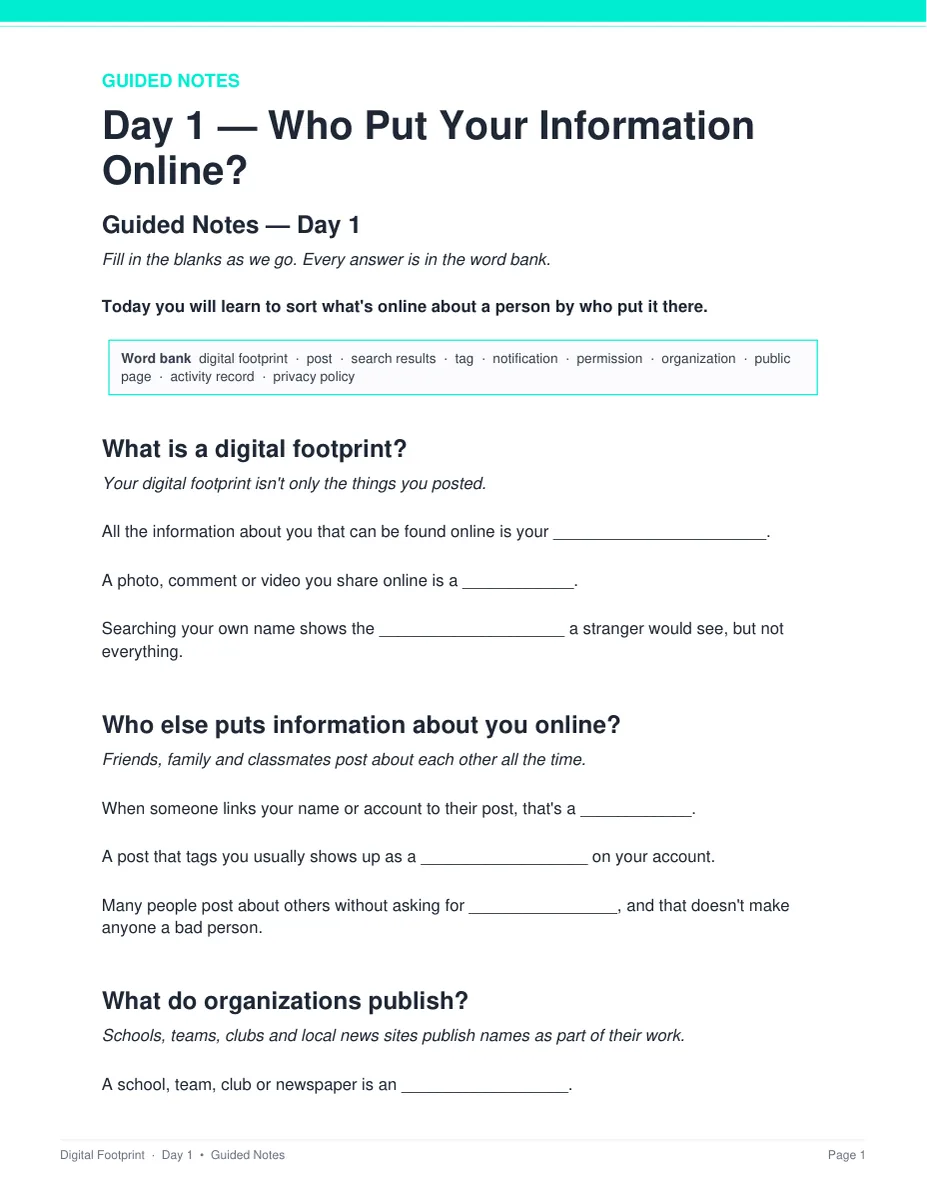
Guided notes students actually fill in

Every day has its own note page built from that day's slides, in the same order you teach them. Editable Word and print-ready PDF, and every one has a complete key.

  • ✓ Word and PDF for all 27 days
  • ✓ Short, complete sentences on every student page
  • ✓ Full answer key for every page
Day 1 guided notes page from the Digital Footprint unit
Cyberbullying & Digital Drama

One printed sheet a day

The activity prints on the page students write on, with the answer boxes right there. Students work it alone first, then check with one partner. Nothing gets cut out, laminated or posted.

  • ✓ A printed activity for every one of the 27 days
  • ✓ Answer boxes sized to how much students should write
  • ✓ A sample answer and when to give the point
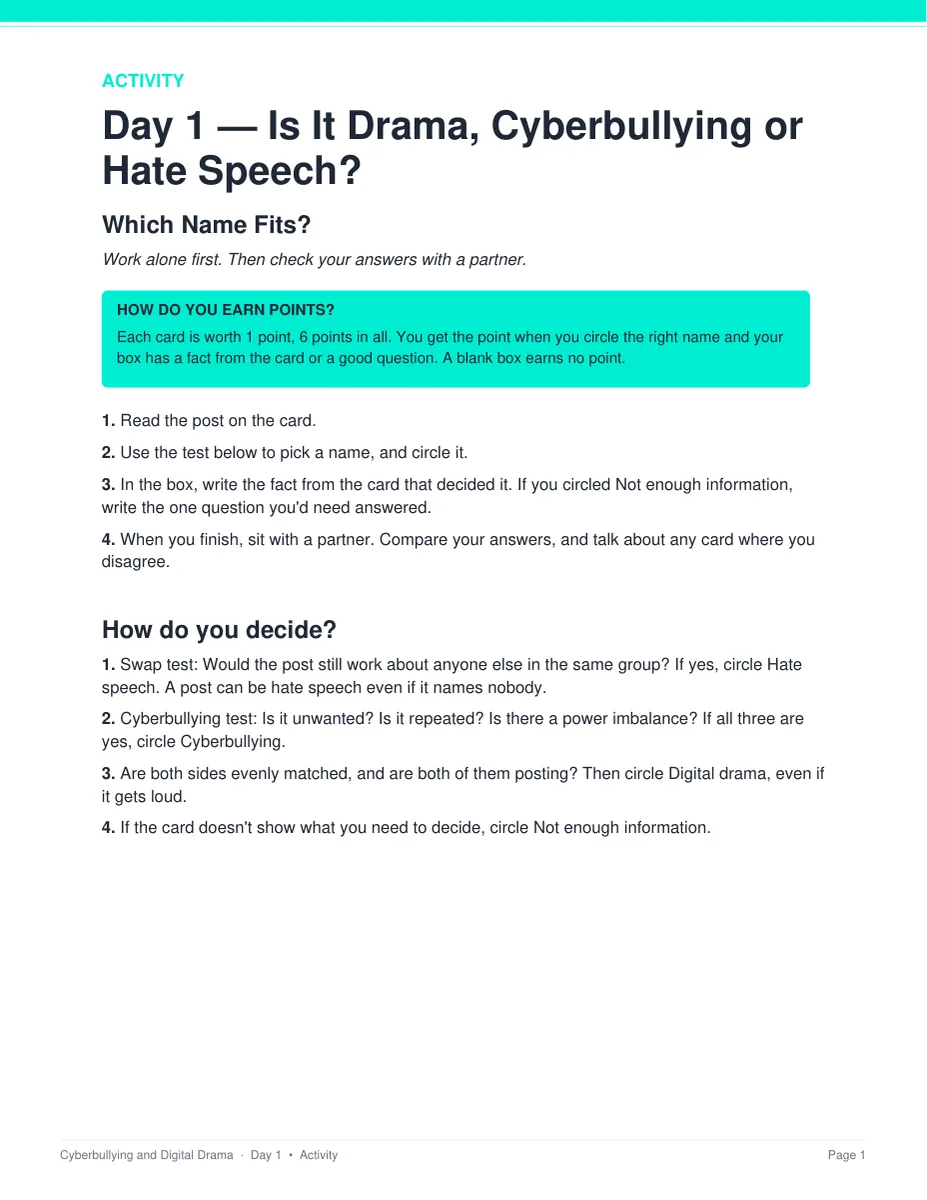
The Which Name Fits? activity sheet from Day 1 of the Cyberbullying and Digital Drama unit
Misinformation & Media Literacy

Original cases with the real messages in them

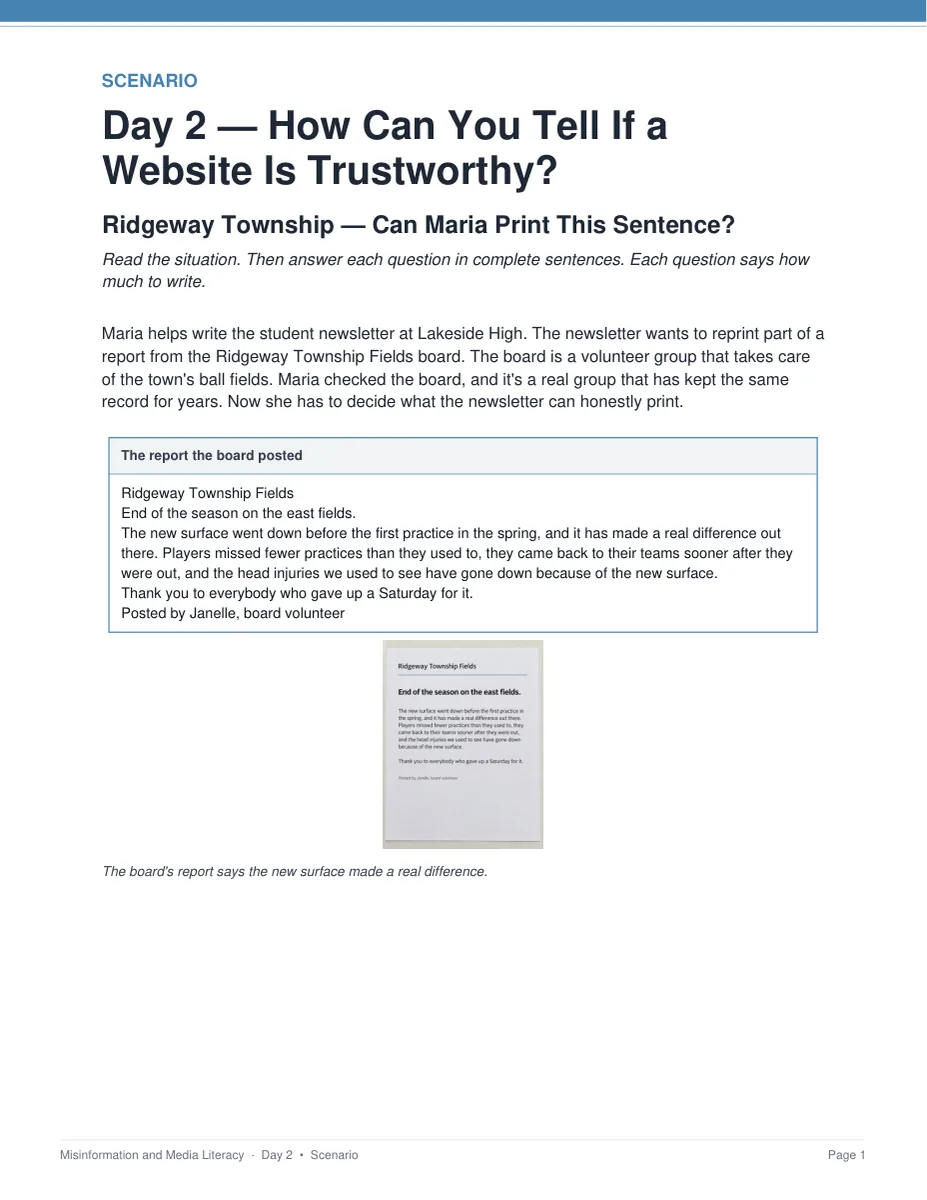
Eighteen long-form scenarios across the bundle, each about a town, a school and a person who do not exist. Students read what was actually posted, then work out what it claims and what to do about it.

  • ✓ Two or three named scenarios per unit
  • ✓ Every person, place and post invented
  • ✓ Teacher key with sample answers
The Ridgeway Township scenario from the Misinformation and Media Literacy unit
Screen Time & Digital Habits

A unit quiz for every unit, already written

Multiple choice and written answers, sitting after the lessons rather than crammed into the last one. Run it as an extra day or set it as a take-home with the self-grading Google Form.

  • ✓ Eight unit quizzes, 23 to 28 points each
  • ✓ Self-grading Google Forms™ version included
  • ✓ Keyed with what to accept and what to reject
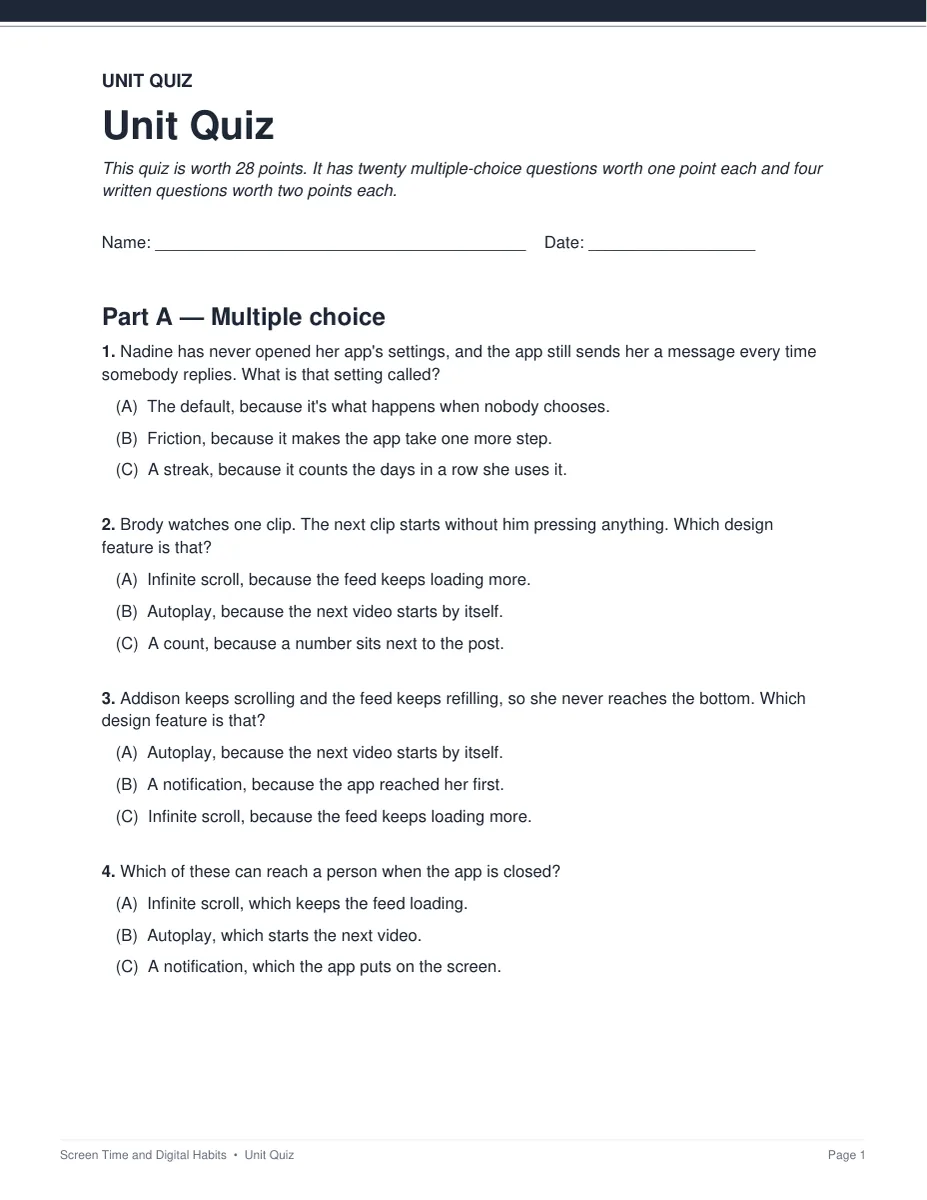
The unit quiz from the Screen Time and Digital Habits unit

What's in the bundle · 8 units

01
Digital Footprint
3 days · 32 files · who put it there, what adds up, what you can change
02
Social Media & Online Safety
3 days · 33 files · ranked feeds, app data, online pressure
03
Cyberbullying & Digital Drama
4 days · 40 files · name it, why it is easier online, what to do
04
Misinformation & Media Literacy
3 days · 32 files · find the claim, check the site, then share
05
Relationships & Communication
3 days · 32 files · what it says, who reads it, how to fix it
06
Screen Time & Digital Habits
4 days · 39 files · the design features and the settings behind them
07
AI Literacy & Chatbots
4 days · 39 files · what it produces, which step is yours
08
Passwords & Account Security
3 days · 32 files · shared with the Cybersecurity Unit Bundle
In every one of the eight units
READ FIRST teacher guide
Minute-by-minute pacing
Skills Map & state standards
Printable bell ringers
Vocabulary glossary
A printed activity a day
Original scenarios
Every answer key

Passwords & Account Security is the eighth unit here and the same unit that ships in the Cybersecurity Unit Bundle — one product sold in both, so if you already own that bundle you already own this unit. Plus a Convert to YOUR State's Standards page in each unit, with a copy-paste AI prompt — this topic files under health in one state and CTE in the next.

Why Teachers Choose It

A situation first, the rule second

Most digital citizenship material is a poster about being kind or a worksheet of definitions. Every unit here opens on something that already happened to somebody, then works out the rule from it.

Nothing says “answers will vary”

Every answer key gives a sample answer and the line that says when to give the point.
The timing was checked minute by minute

Five minutes of bell ringer, 13 of slides and guided notes, 20 of activity, 7 for the exit ticket. Every day fits a 45-minute period and the teacher guide prints the schedule.
Plain, student-friendly wording

Every student page uses short, complete sentences, so students at every reading level can follow along. You do not need a background in any of these topics to teach them.

Nothing to cut out

Every activity prints on the page the student writes on, with the answer boxes right there. Nothing to cut, laminate or post, and students write in boxes rather than on lines.
Safe to teach in any room

Every person, post and place is made up, and no student page names a real app, company or person. No task asks a student to share their own experiences, and every safety route ends with a trusted adult.

It runs from the download

No outside videos, articles or logins. Everything a day needs is in the folder, in PowerPoint, Word and print-ready PDF, and every file is editable.

Self-grading Google Forms™

35 forms across the bundle. Multiple choice auto-grades on submit with feedback on every wrong answer, and the written responses land in your response sheet.

What Teachers Say

Be the first to review this

Reviews help me a lot, and they help other teachers pick the right resources for their classes. It takes about a minute.

Leave a review

FAQ

What exactly is in the bundle?
Eight complete units — Digital Footprint (3 days), Social Media & Online Safety (3 days), Cyberbullying & Digital Drama (4 days), Misinformation & Media Literacy (3 days), Relationships & Communication (3 days), Screen Time & Digital Habits (4 days), AI Literacy & Chatbots (4 days), and Passwords & Account Security (3 days). 279 files in all: 332 editable slides across the decks, guided notes in Word and PDF, 18 original scenarios, a printed activity sheet for every day, an exit ticket per day, a unit quiz worth 23 to 28 points for each unit, 35 self-grading Google Forms™, 270 vocabulary terms, and an answer key for every page.
Is Passwords & Account Security the same unit that is in the Cybersecurity bundle?
Yes. It is one unit sold in two bundles — it belongs to the evergreen Cybersecurity line and is the eighth unit here, so its page lives with the cybersecurity units. If you already own the Cybersecurity Unit Bundle you already own it, and the counts on this page include it either way.
Do I need a background in this to teach it?
No. These are general-education digital-literacy units written for a teacher who has never taught the subject — advisory, health, English, computer science or CTE. Every unit opens with a READ FIRST guide that says what to print and when, the speaker notes say what to say, and every page has a key.
Do the units have to be taught in order?
No. Each unit stands on its own and can be taught in any order, or on its own as a one-week block. The order shown is simply the one that reads best if you are teaching all eight: what a person leaves behind, what a service does with a feed, what happens when attention turns on somebody, how a claim is checked, how to say the thing you actually meant, what screen time takes the place of, how to use a chatbot well, and how an account is protected and recovered.
Is it safe to hand out as-is?
Yes. Every person, school, company and post in these units is invented, with no working links and no real logos, and no student page names a real app or brand. No task asks a student to share their own experiences, and every safety route ends with a trusted adult. The cyberbullying unit goes further: no story in it ends in a death or self-harm, and its safety page tells you who in your building to go to rather than asking you to judge whether a student is at risk.
Can I buy just one unit?
Yes. Every unit is sold on its own. The bundle costs less than the eight singles together, so it only makes sense if you want more than two of them.
What formats are the files in?
Editable .pptx decks, editable .docx handouts, and print-ready .pdf of everything, plus self-grading Google Forms™ for every quiz and exit ticket. Each unit includes a Digital page with the copy links, so one click puts your own copy in your own Drive. Nothing is locked.

Teach digital citizenship next week.

One download. Eight units, 27 days planned, every key included.

See the eight units