
Digital Footprint
 Digital Citizenship Grades 9–12 3-day unit 32 deliverables
 Most digital footprint lessons tell students to be careful what they post. That advice misses most of a footprint, because somebody else put a lot of it there. Three complete lessons on who put each piece online, what small public details add up to, and what a student can actually change.
● Instant download · Lifetime access · Editable & print-ready
 Editable formatsPowerPoint, Word, PDF & Google
 Every page keyedNothing says “answers will vary”
 Self-grading formsThe quiz and all 3 exit tickets
 No background neededPrint it and teach it
What does this unit cover?
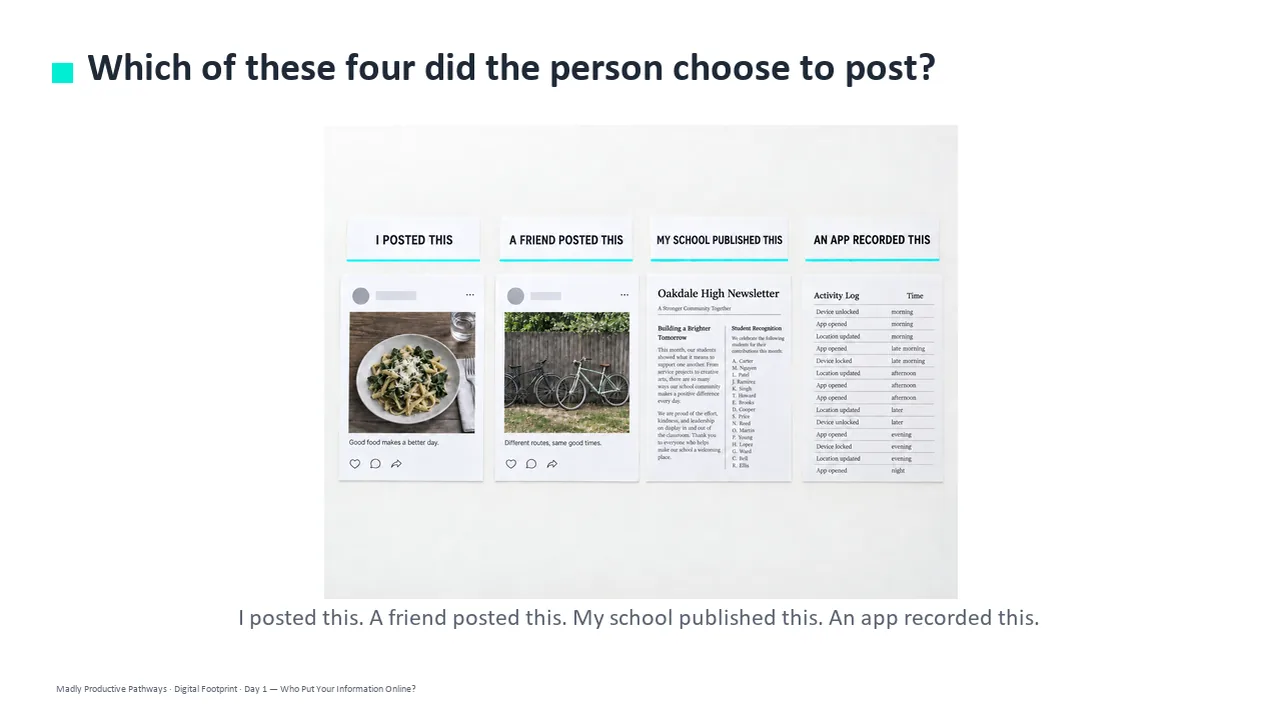
Three days built on the fact most lessons skip: a lot of a person's footprint was put there by somebody else. The unit sorts a footprint into four sources — you put it there, someone who knows you put it there, an organization published it, a company recorded it quietly — and those four words carry through all three days, the activities and the quiz. Day 1 is who put it there, Day 2 is what small public details add up to, Day 3 is what a student can actually change.
Day 3 is deliberately honest. Deleting works on your own posts and nothing else, so every other problem gets the step that fits it: ask whoever posted it, add something newer, or share less from now on. No page tells students to stop posting, no page blames a student for being in somebody else's photo, and no page says the internet is forever — a Day 3 speaker note calls that a slogan rather than a fact.
Each day runs the same way: a bell ringer (5 minutes), guided notes off the deck (13), the activity where the learning actually happens (20), and an exit ticket on the way out (7). Everything follows the same open-and-teach folders as the rest of the line: 00 Start Here / 01 Present / 02 Student Handouts / 03 Scenarios / 04 Activities / 05 Assessment / 06 Answer Keys. Every student page uses short, complete sentences, so students at every reading level can follow along.
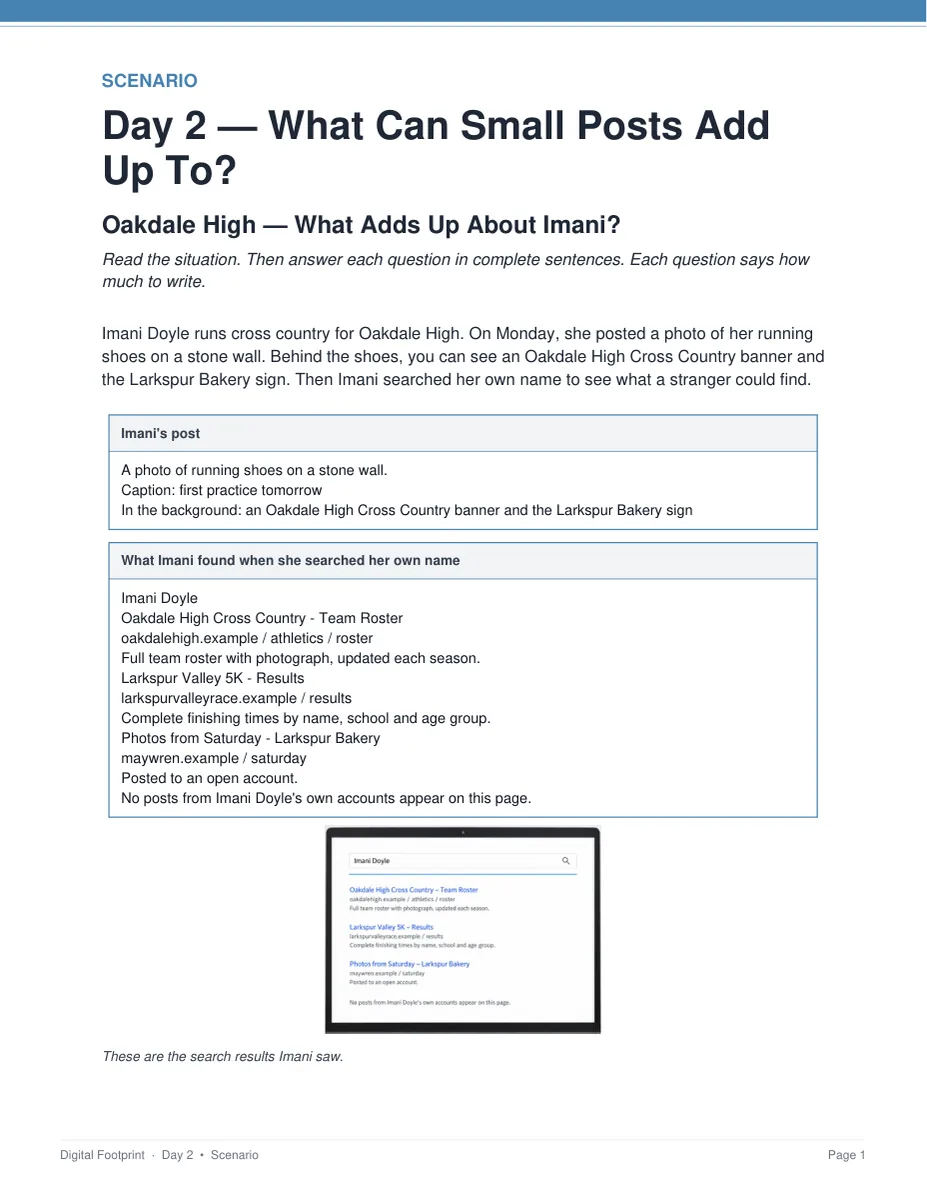
Oakdale High — What Adds Up About Imani?
A runner posts a photo of her shoes, then searches her own name. None of the results came from her — a team roster, finishing times listed by name and school, photos from somebody else's open account — but together they show who she is and where she goes. Students combine two results, say where and when a stranger could expect to find her, and explain what deleting the shoe post would and would not change. Keyed with a model answer for every question.
Everything that's included
 00 Start Here: Teacher
- READ FIRST teacher guide: what to print, in what order
- Teacher guide and pacing: measured minute-by-minute timings for all three days
- Skills Map and state standards, with step-by-step directions and a ready-to-paste AI prompt for your own state's codes
 01 Present: Whole class
- One editable PowerPoint deck per day (36 slides, 7 with pictures)
- Three printable bell ringers, one warm-up per day
 02 Student Handouts
- Guided notes for all three days, in editable Word and print PDF — 2 pages and 10 blanks each
- Vocabulary glossary: all 30 key words, 10 per day, every one taken from that day's word bank
 03 Scenarios
- Oakdale High — What Adds Up About Imani?, keyed
- Noor's Repair Page — What Can She Change?, keyed
 04 Activities
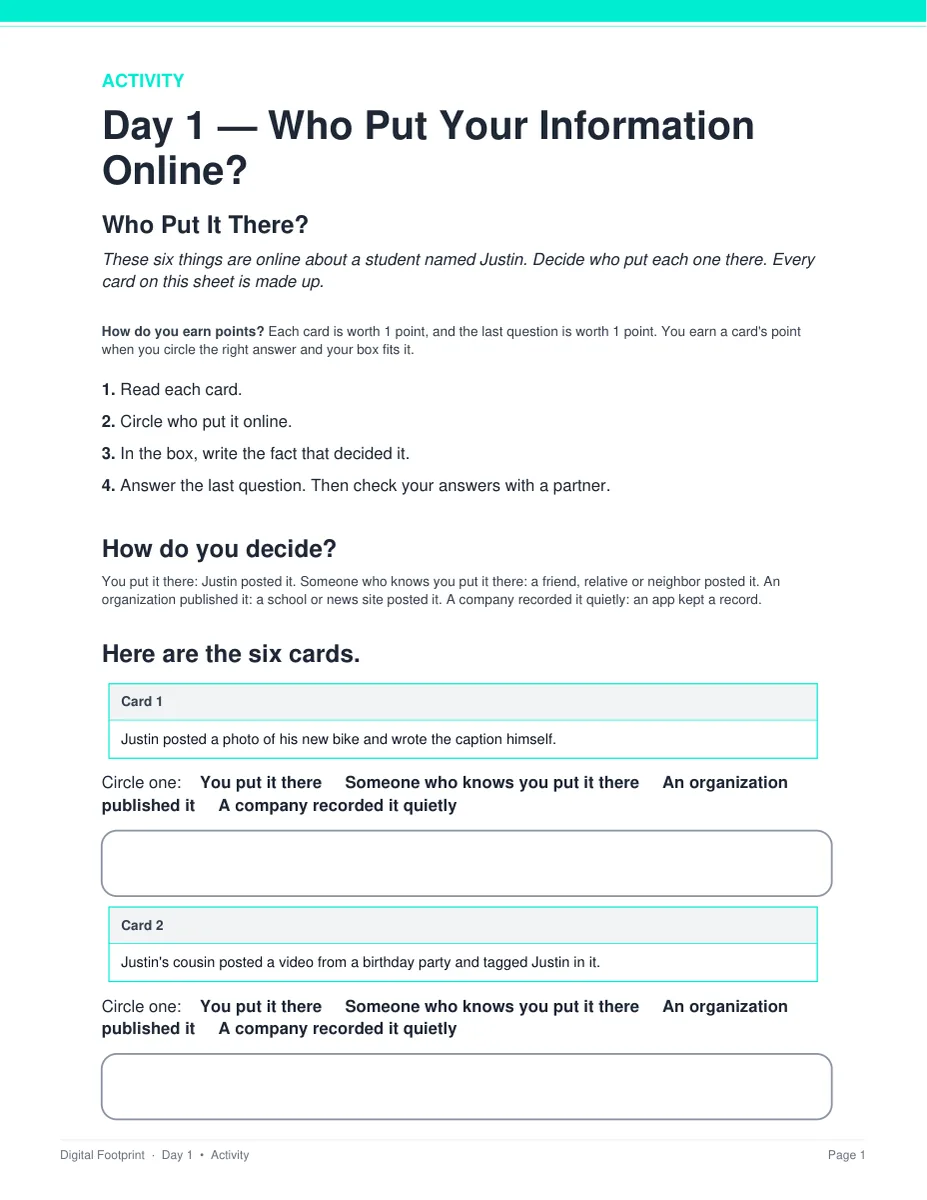
- Who Put It There?: sort six things about one student by who put each one online
- What Could Someone Figure Out?: what six ordinary posts show a stranger
- How Much Control Do You Have?: match each item to the step that actually fits it
 05 Assessment
- Three exit tickets, one per day, 5 points each
- Unit quiz: 23 points, 15 multiple choice and 4 written
Digital: self-grading Google Forms™
- The unit quiz and all three exit tickets as ready-to-assign forms — four forms, 21 auto-graded items
- Multiple choice grades itself on submit, with feedback on every wrong answer; written responses land in your response sheet. Every link ends in /copy, so you get your own copy of each form.
06 Answer Keys
- Six key PDFs: one per day, one for all three activities, one for both scenarios, and one for the quiz
- Every written prompt keyed with what to look for, a model answer, and a line that says when to give the point
See the actual pages
Page one of four real files out of the download, exactly as they print.
One editable deck per day
Twelve slides a day, low text, with the icons and layouts built as editable shapes rather than flat images. Recolor them to match your room, or delete any of them.
- ✓ 36 slides across the three days, 9 pictures in all
- ✓ Native PowerPoint, opens in Google Slides
- ✓ Speaker notes on every slide
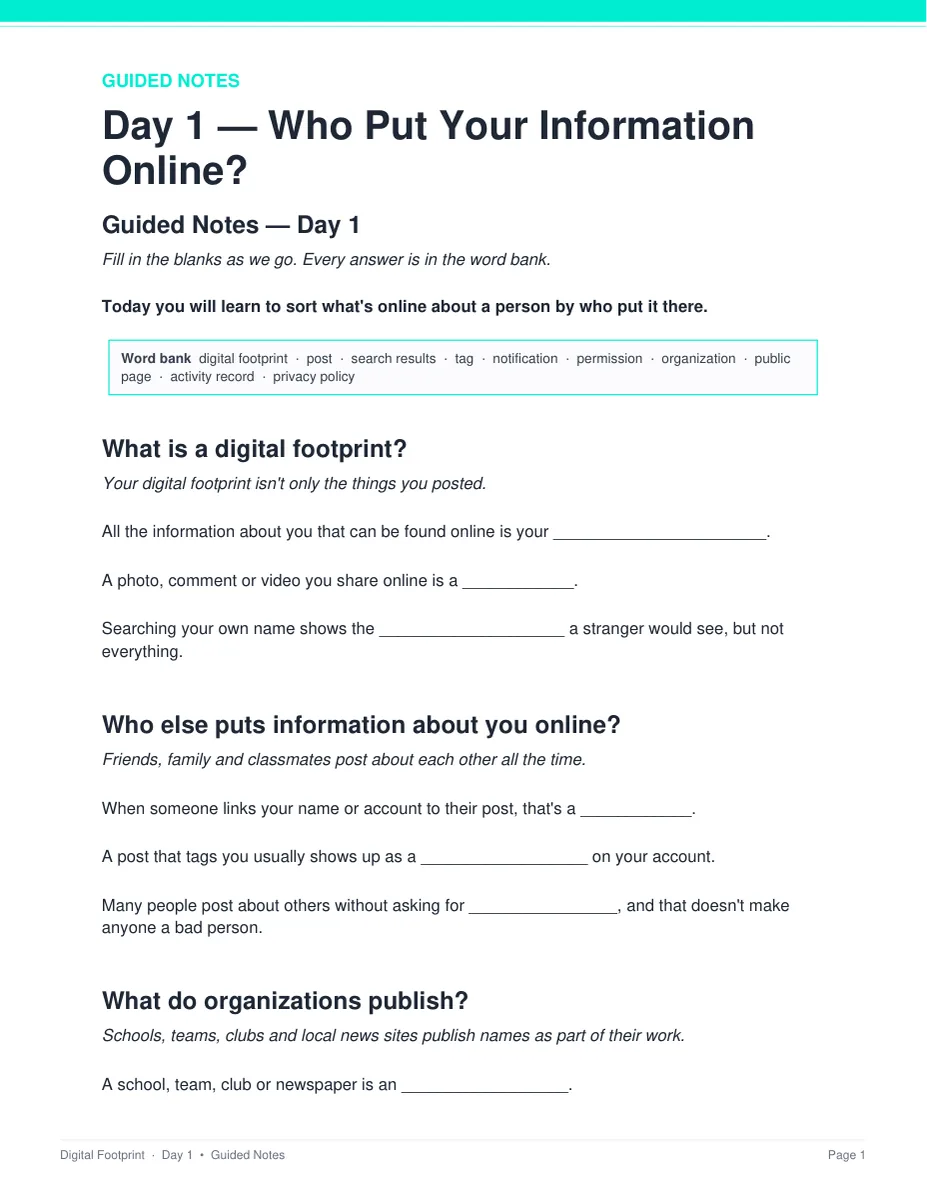
Notes students fill in as you teach
Two pages a day with the word bank printed at the top, ten blanks to fill as the deck goes by, and a REMEMBER box at the end. Editable Word and print-ready PDF, and every one has a complete key.
- ✓ Three days, Word and PDF
- ✓ 10 blanks a day, 30 key words in all
- ✓ Full answer key for every page
A search that happened to nobody real
Two long-form cases about people who do not exist. Students read what a search actually returned, work out what the results add up to together, then say which step fits each one.
- ✓ Oakdale High and Noor's Repair Page
- ✓ 3 points each, with a hint under question 1
- ✓ Teacher key with a model answer for every question
Six cards a day, and every call gets defended
Students circle the answer and then write the fact that decided it, so the page is an argument rather than a fill-in-the-blank. Nothing to cut out and nothing to laminate.
- ✓ Print and go, no prep
- ✓ 7 points each, keyed item by item
- ✓ Answer keys for all three activities
Why teachers pick this unit
 It corrects what students believe
Ask a class who put their footprint online and they will say they did. In the Day 1 activity, exactly one of the six things belongs to the student — and that is the whole point of the day.
Nothing says “answers will vary”Every written question ships with what to look for, a model answer, and a line that says when to give the point.
The timings are measuredEvery activity was costed against real reading and writing rates. Each day is 5 minutes of bell ringer, 13 of slides and notes, 20 of activity and 7 of exit ticket, and every day fits a 45-minute period with time to spare.
 No background needed
Written for a general-education class — digital citizenship, computer science, advisory or technology. Nothing to prepare beyond hitting print, and every day stands alone as a sub plan.
 Everything in it is invented
Every person, post, search result, school and app is made up. No task asks a student to search for anyone else, and no page blames a student for being online or for being in somebody else's photo.
Print and digitalPrint-ready PDFs plus four self-grading Google Forms™ for the quiz and all three exit tickets.
What Teachers Say
Be the first to review this
Reviews help me a lot, and they help other teachers pick the right resources for their classes. It takes about a minute.
Leave a reviewQuestions teachers ask
How do I get the files after I buy?
Instant download right after checkout. You get editable PowerPoint and Word, print-ready PDF of everything, and the links for the self-grading Google Forms™.
I don't know much about privacy myself. Can I still teach it?
Yes. Each day has a plan, the speaker notes tell you what to say, and every page has a key. The READ FIRST guide says exactly what to print and in what order.
Will this scare my students?
No. Every person, post and place in the unit is made up, and no page blames a student for being online. The unit never tells students to stop posting — it tells them who put each piece there and which steps actually work.
When does the unit quiz happen?
After the three lessons, not inside them. The quiz is about 25 minutes and all three periods are full lessons, so run it as a Day 4 in class or set it as homework with the Google Form. Either way you already have a grade for every student from the three exit tickets.
What standards does it map to?
It is a general-education digital-literacy unit, so it maps onto reading standards rather than a computer science framework: ISTE 1.2.a, ISTE 1.2.d and CCSS RI.9-10.1 with its 11-12 equivalent, every code checked against its official wording. A Skills Map is included, plus a page of step-by-step directions and a ready-to-paste AI prompt for finding your own state's codes.
Can I buy this with the other digital citizenship units?
Yes. The Digital Citizenship Unit Bundle holds this unit plus seven more — 27 teaching days in one download, and it costs less than buying the units one at a time.