AI literacy is the fastest-rising topic in any tech classroom right now, and most of the conversation around it is stuck on one note: stopping cheating. That matters, but it’s the smallest part of the job. Your students will use these tools for the rest of their lives, and the goal is sharp users who know what’s happening under the hood, not nervous ones who got told not to. This is a bank of activities you can run this week, most needing nothing more than a browser and a free chatbot.
For the wider map of how this fits with computer science, cybersecurity, and digital skills, start with How to Teach High School Technology.
What is AI literacy (and why it’s not the same as using AI to cheat)?
AI literacy is understanding how these tools work, where they fail, and how to use them responsibly. It’s a thinking skill, not a typing skill. A student who can paste a prompt and copy the answer is not AI literate; a student who can tell you why the answer might be wrong, where the bias crept in, and when it would be dishonest to use it is.
That distinction is the whole point. “Don’t use AI to cheat” is a rule. AI literacy is the actual education: it gives students the judgment to decide when a tool helps and when it hollows out their own learning. Teach the judgment and the cheating problem mostly takes care of itself.
The three pillars worth covering:
- How it works: AI predicts likely text, it doesn’t “know” things.
- Where it fails: it hallucinates, it’s biased, and it sounds equally confident whether it’s right or wrong.
- How to use it well: as a draft partner, a tutor, or a brainstorm tool, with a human checking the output every time.
Quick AI literacy activities (15-minute options)
You don’t need a whole unit to get started. These fit in a bell ringer or the tail end of a class.
- Hallucination spot-check: ask the chatbot for five facts about a topic students actually know (your town, your school’s history, a niche hobby), then have them flag what it got wrong. The closer to home, the more confident-and-wrong it tends to be.
- One prompt, three ways: give the same task to three students with three different prompts and compare the output. It makes the “garbage in, garbage out” point faster than any lecture.
- Citation check: ask AI for sources on a topic, then try to find them. Fabricated citations are a reliable, eye-opening demo.
How do you teach AI bias and how AI actually works?
These two go together, because once students see how the thing predicts text, bias stops looking like a glitch and starts looking like a built-in consequence.
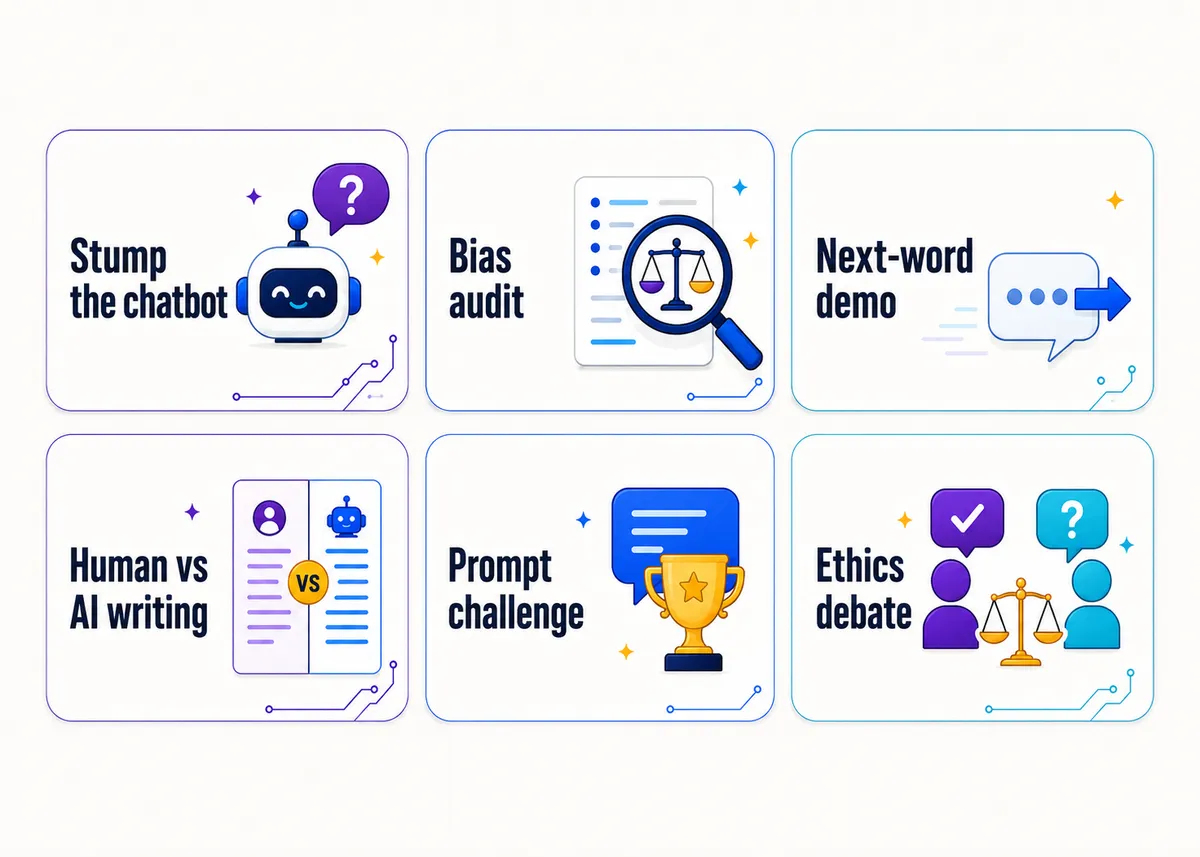
The “how does it predict the next word” demo. Type half a sentence and have the class shout the next word before the chatbot fills it in (“peanut butter and…,” “the capital of France is…”). Then push into something with no single answer (“a good leader is someone who…”) and watch the model pick the statistically common ending. The takeaway lands on its own: it’s guessing the likeliest next word from its training patterns, not retrieving a fact or forming an opinion.
The bias audit. Have students prompt an AI image or text tool with role-based requests (“draw a CEO,” “draw a nurse,” “describe a typical scientist”) and log what they get back across ten or fifteen tries. Patterns show up fast (who’s pictured as the boss, who’s pictured as the helper), and then you connect it to the demo above: the model returns what was most common in its training data, so bias in the data becomes bias in the output. This is the most reliably jaw-dropping activity in the bank.
| Activity | What students see | The point it makes |
|---|---|---|
| Next-word demo | The model picks the likeliest word | AI predicts, it doesn’t know |
| Bias audit | Repeated stereotyped outputs | Biased data makes biased AI |
| Hallucination hunt | Confident, wrong answers | Fluent is not the same as correct |
How do you teach responsible, ethical AI use?
This is where the cheating conversation finally belongs, framed as judgment instead of a ban. The honest question isn’t “is AI allowed,” it’s “when does using it help you learn, and when does it rob you of the learning?” Students can reason about that line if you let them.
A few activities that build the judgment:
- The ethics scenario debate. Hand out short scenarios and have students argue whether the AI use is fine, gray, or clearly wrong: brainstorming essay topics, writing the whole essay, explaining a math concept the teacher already covered, generating a college application essay, summarizing a reading nobody did. The gray ones spark the best arguments, and students end up writing a sharper AI-use policy than any you’d hand them.
- The human-vs-AI writing compare. Give students a short prompt, have them write a paragraph, then have AI write the same paragraph, and compare side by side. They’ll spot the AI’s tells (generic, hedge-everything, no real voice), and come away both less afraid of it and less impressed by it.
- Disclosure practice. Have students complete a small assignment using AI, then write two sentences on exactly what they used it for. Normalizing honest disclosure does more for academic integrity than a detector ever will.
Responsible use is a sibling of broader online judgment, so pair this with Digital Citizenship Activities for High School. And if your worry is specifically students using AI to skip the work in a coding class, How to Stop AI Cheating in Coding Class is the targeted guide.
A prompt-engineering challenge (with a rubric)
Prompting well is a real skill, and it grades cleanly, which makes it a great project. Give the class one goal (“get the AI to write a usable cover letter for a specific job posting”) and have them iterate their prompt until the output is genuinely good. Then grade the prompt and the reasoning, not the AI’s words.
A simple rubric that works:
- Clarity and specificity (does the prompt give role, context, and constraints?)
- Iteration (did they refine after a weak first try, and can they explain what they changed?)
- Output evaluation (can they critique the result and say what’s still wrong with it?)
That last row is the one that matters. A student who gets a decent output but can’t tell you what’s weak about it hasn’t built the skill yet. We go deeper on grading the thinking instead of the artifact in How to Use AI in the CTE Classroom.
Free AI curriculum (named accurately)
You don’t have to build this from scratch, and two free options are genuinely good:
- Day of AI (from MIT RAISE) offers free, grade-banded AI literacy lessons, including hands-on units on bias, generative AI, and how these systems work. It’s a strong, already-sequenced starting point.
- Common Sense Education’s AI literacy lessons fold AI into their well-known digital citizenship framework, with classroom-ready lessons on how AI works, bias, and responsible use. If you already teach digital citizenship, these slot in cleanly.
Both are free, both are built for teachers who aren’t AI experts, and both pair well with the quick activities above. Use them for structure, and use the activities here when you want something fast and hands-on.
Frequently asked questions
What is AI literacy for students? It’s the ability to understand how AI tools work, recognize where they fail (hallucinations, bias, false confidence), and use them responsibly and honestly. It’s a judgment skill, not just knowing how to type a prompt.
Do I need to be an AI expert to teach this? No. The strongest activities (a bias audit, a hallucination hunt, an ethics debate) run on a free chatbot and good questions, not technical expertise. Free curricula like Day of AI and Common Sense Education’s AI lessons do the structural heavy lifting.
How do you teach AI without encouraging cheating? Teach the judgment, not just the ban. When students understand what a chatbot actually does and can spot where it’s wrong, they’re less impressed by it and better at deciding when using it helps their learning versus when it replaces it.
What’s the best single AI literacy activity to start with? The bias audit. Have students prompt an AI image tool with role-based requests (“draw a CEO,” “draw a nurse”) across several tries and log the patterns. It’s fast, it needs no setup, and it permanently changes how students view AI output.
How do you grade an AI literacy activity? Grade the student’s thinking, not the AI’s words. On a prompt-engineering challenge, score the clarity of the prompt, whether they iterated after a weak first try, and whether they can critique what’s still wrong with the output. A student who got a decent result but can’t name its flaws hasn’t built the skill yet. We go deeper on this in How to Use AI in the CTE Classroom.
Free resources and done-for-you curriculum
Want a no-prep starting point? The Free Library has bell ringers and first-week activities that work across the tech subjects, AI literacy included, plus a ready-made AI use policy if you need a classroom stance in writing. And if you’d rather not assemble the whole unit yourself, the Impact of Computing unit of our editable AP Computer Science Principles curriculum puts bias, ethics, and the how-does-it-actually-work questions at the center of real lessons. Students drawn to the security angle can keep going with the AP Cybersecurity curriculum.