A free code editor for your classroom
CodeGrove runs Python in the browser with no student accounts. You hand out a link, students write and run their code, and you check the whole class from one page.
Free, with no sign-in. Checked November 10, 2026.
What CodeGrove is
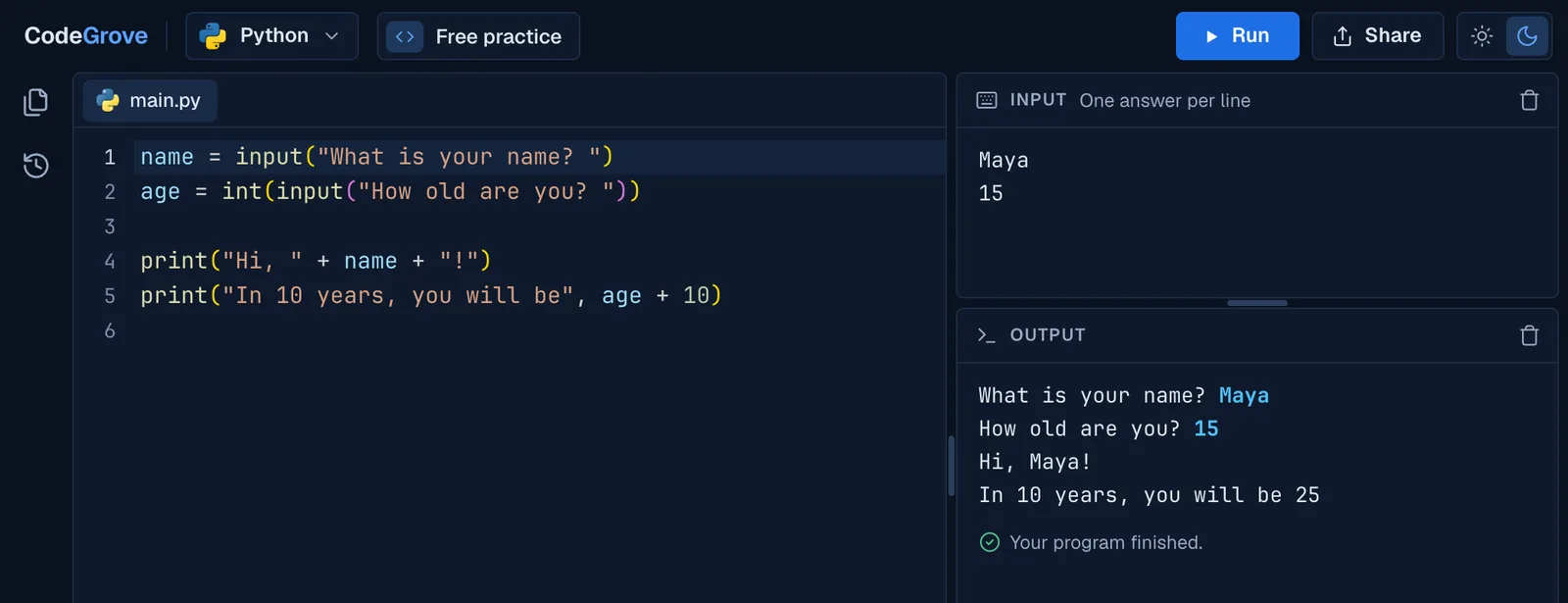
A free code editor that runs in the browser. Students write Python, press Run, and see the output, their input() prompts, turtle drawings or robot moves right next to their code. There are no accounts, no ads and no AI assistant, and student work stays on the student's own device.
It works on Chromebooks, Windows and Mac laptops, and tablets turned sideways. On a phone it shows a short note asking for a bigger screen.
Hand out a starter program
- Write the starter in CodeGrove. Open CodeGrove, which starts in Free practice, and type or paste the program students should begin with.
- Copy its link. Press Share, then Copy link. The code is inside the link itself, so nothing is uploaded anywhere.
- Post the link. Put it in Google Classroom, Canvas, Schoology or a slide. A student who opens it gets CodeGrove with your code in the editor, ready to run.
A very long program will not fit in a link. CodeGrove says so and offers Download file instead.
Collect the work and check a whole class
- Students turn in a link. When they finish, students press Share, then Copy link, and paste it into your turn-in Google Form. Students can also press Download file and turn in the file.
- Open Grade a whole class. Go to madlyproductivepathways.com/codegrove/grade. In your Form, click Responses, then Link to Sheets. Copy the whole sheet and paste it into the page, or drop students' .py and .zip files on it.
- Press Check the class. For CodeGrove's own levels, the results show each student's level and task, how many checks passed and how many hints they used. Free practice code is listed too, and any student's code opens in CodeGrove with one click. Copy or download the results for your gradebook.
The names, links and files you paste stay in your browser. The grade page sends nothing anywhere and has no analytics.
Ready-made levels for a Python class
CodeGrove also holds 203 coding levels from our Intro to Python Programming and Python Programming 2 courses. Each level has a task, an example, hidden tests behind the Check button, and up to three hints. The screen tells students that Check is not their grade, so they use it to test their thinking.
The levels are free to use. See them by unit, each with its own link to hand out.
Built without AI
CodeGrove has no AI chat and no AI autocomplete. A plain word list suggests Python words as students type, the way any code editor does.
History keeps a copy of a student's code every time they press Run or Check, and Show changes compares any copy with the code they have now. On the student's device, you and the student can see exactly how a program came together.
The robot and the turtle
Two views go beyond text. In the robot room, students drive a robot through a room with Python, one move at a time. With Python's turtle, they draw. Both can play step by step, so students see exactly what each line does.
For your IT team
- Two addresses to allow. www.madlyproductivepathways.com, where the editor loads, and run.madlyproductivepathways.com, where student code runs. The second one is kept apart from the main site on purpose, so a student's program can never reach the page around it.
- Nothing to install. No extension, no app and no plugin. It runs in Chrome on managed Chromebooks.
- No accounts. No sign-in, no single sign-on and no rostering. Code and History stay in the browser on the student's device.
- Analytics only. The pages count visits with Google Analytics, with Google's advertising features turned off. There are no ads and no other trackers, and blocking Google Analytics breaks nothing. The details are in our privacy policy.
The Google Admin console settings, to allow both addresses or put CodeGrove on every Chromebook, are spelled out step by step on Python on a school Chromebook.
Common questions
Is CodeGrove free for schools?
Yes. The editor and its levels are free for students and teachers, with no paid tier. We built CodeGrove for our own Python courses, which are sold separately, and anyone can use the editor.
Do students need an email address or a Google account?
No. Students open a link and start. They type a name only when they download a level's code, so the file says whose it is, and that name stays on their device.
Where is student work saved?
In the browser on the student's own device, along with a History of every run. A student who switches devices brings their work along with Copy link or Download file.
Can I watch students' screens or code live?
No. There is no live dashboard, because nothing a student types is sent to a server. Students hand in work as a link or a file, and Grade a whole class checks it all at once.
Can I embed CodeGrove in Google Sites, Canvas or Schoology?
Not yet. Post a CodeGrove link instead. The code rides inside the link, so students open exactly the program you wrote.
Which languages does CodeGrove run?
Python today, with turtle graphics and a robot to program. More languages are on the way.
More about CodeGrove
Try it with your class
CodeGrove is free for students and teachers. There is nothing to install and no account to make: open the link on a Chromebook, laptop or tablet and start writing code.