How to run Python on a school Chromebook
You cannot install Python on most school Chromebooks, and you do not need to. Students can write and run Python in Chrome, with nothing to install and no account.
Free, with no sign-in. Checked November 10, 2026.
The short answer
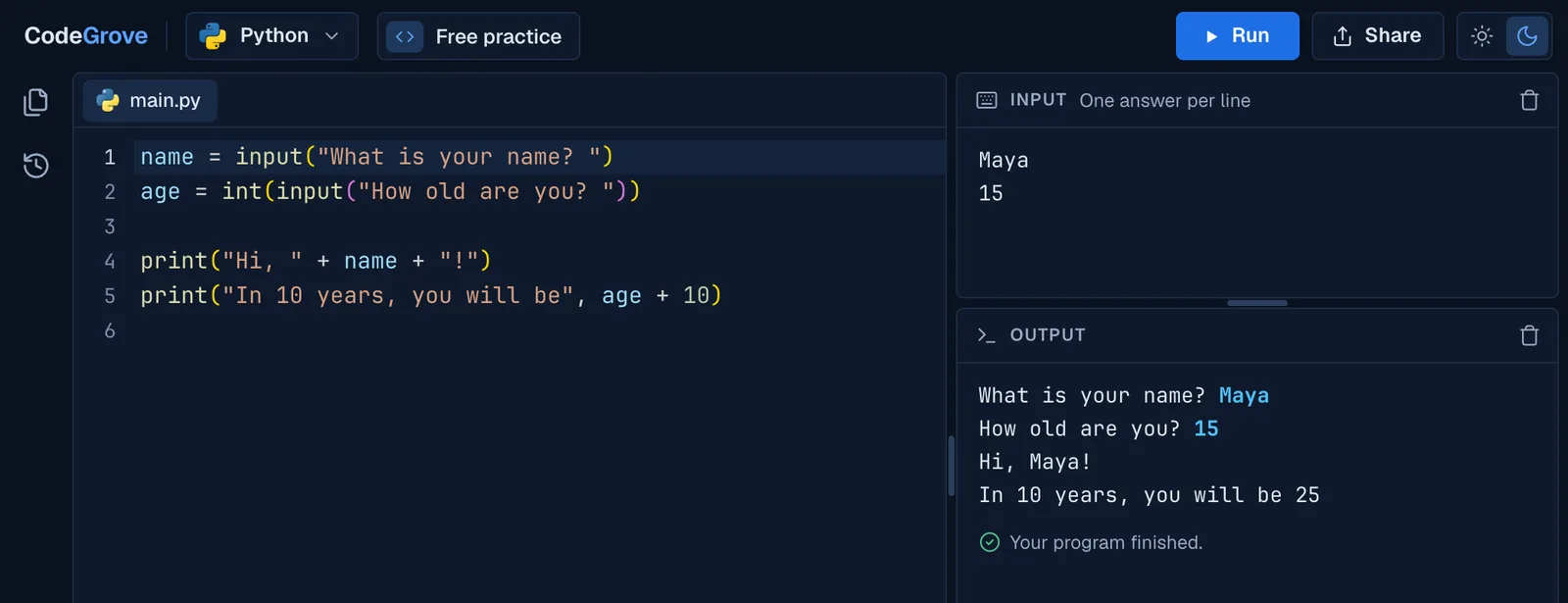
Use a code editor that runs Python inside the browser. CodeGrove is free: open madlyproductivepathways.com/codegrove on the Chromebook, type a program and press Run. No install, no admin rights and no sign-in.
Why Python will not install on a school Chromebook
ChromeOS cannot run the Python installer for Windows or Mac. The usual way to get Python on a Chromebook is its Linux environment, and on school-managed Chromebooks Google blocks Linux unless an administrator turns it on. Google's help for students warns that a school Chromebook may not allow it.
A browser-based editor skips all of that. The Python runs inside Chrome, so all it needs from IT is two web addresses that are not blocked.
Run Python in Chrome, step by step
- Open CodeGrove. Go to madlyproductivepathways.com/codegrove. The first visit loads Python, which can take up to 20 seconds. After that, it starts faster.
- Write and run. Type your program in main.py and press Run, or Ctrl and Enter.
- Answer input(). If the program asks questions, type the answers in the Input panel, one per line. If it needs more, it asks in the Output panel.
- Keep your work. CodeGrove saves your code in Chrome on that Chromebook and keeps a History of each run. To move it to another device or hand it in, press Share, then Copy link or Download file.
A first program to try. It opens in CodeGrove ready to run:
name = input("What is your name? ")
print("Hi, " + name + "! Python is running on this Chromebook.")CodeGrove runs Python 3.14, with turtle drawings and a robot to program. See Python turtle online for drawing programs that run on a Chromebook too.
For school IT: the Google Admin console
Allow the two addresses
CodeGrove loads from www.madlyproductivepathways.com and runs student code on run.madlyproductivepathways.com, kept apart from the main site so a program can never reach the page around it. If your Chromebooks block most sites, go to Devices, then Chrome, then Settings, and under Content open URL blocking. Add madlyproductivepathways.com to Blocked URL exceptions. A bare domain covers its subdomains, so that one entry allows both.
Put CodeGrove on every Chromebook (optional)
In Devices, then Chrome, then Apps and extensions, open Users and browsers, choose the organizational unit and use Add by URL. Enter https://www.madlyproductivepathways.com/codegrove and choose whether it opens in a browser tab or its own window. Then set the installation policy to Force install + pin to ChromeOS taskbar. CodeGrove needs no Chrome Web Store listing for this, because it installs as a website shortcut.
What it does not need
No extension, no Linux, no developer mode, no accounts and no single sign-on. The pages count visits with Google Analytics, with Google's advertising features turned off, and blocking Google Analytics breaks nothing. How CodeGrove handles student data.
Common questions
Can you run Python on a Chromebook without Linux?
Yes, in the browser. CodeGrove runs Python inside Chrome, so it needs no Linux, no install and no admin rights.
Do students need a Google account to use it?
No. CodeGrove has no sign-in of any kind. Students need Chrome and the link.
Will it work with our web filter?
Allow www.madlyproductivepathways.com and run.madlyproductivepathways.com. In Google's own URL blocking, the bare domain madlyproductivepathways.com covers both.
Where does the code actually run?
On the Chromebook itself, inside Chrome. Nothing a student types is sent to a server, which is also why there is no account to make.
Can students use it on a tablet?
Yes, on a tablet turned sideways. CodeGrove needs a bigger screen than a phone.
Is it free?
Yes, for students and teachers, with no paid tier and no ads.
More about CodeGrove
Try it with your class
CodeGrove is free for students and teachers. There is nothing to install and no account to make: open the link on a Chromebook, laptop or tablet and start writing code.