Cybersecurity is the subject teachers tense up about most, usually for the wrong reason: the fear that “hands-on” means teaching kids to break into things. It doesn’t. The best cybersecurity activities never touch a real exploit. They put students in the defender’s chair and make them reason about risk, tradeoffs, and how to protect a system. That’s also how the job actually works, and it’s far more teachable than the intimidation suggests.
Below are activities you can run with a beginner class, plus how to think about competitions and where to find free tools. None require students to write a single line of attack code. For the bigger-picture scope and sequence, see How to Teach Cybersecurity to Beginners. This post is the activity bank.
What makes a good cybersecurity activity?
A cybersecurity activity earns its place when it does three things at once:
- It centers defense, not offense. Students reason about how to protect a system, spot an attack, or weigh a risk. They are never asked to break into anything real.
- It forces a judgment call. The point isn’t a vocabulary term, it’s a decision: is this email safe, is this password good enough, where is this system most exposed. Cybersecurity is a field of tradeoffs, and the activity should make students feel one.
- It connects to something they already use. A school login, a phishing text they actually got, a data breach that hit a company they know. The closer to their real digital life, the harder they lean in.
Keep the stakes low and the reasoning visible. The good news (the same news that runs through all of CTE) is that you grade the thinking, not whether they landed on the one “right” answer you had in your head.
Hands-on cybersecurity activities (no hacking required)
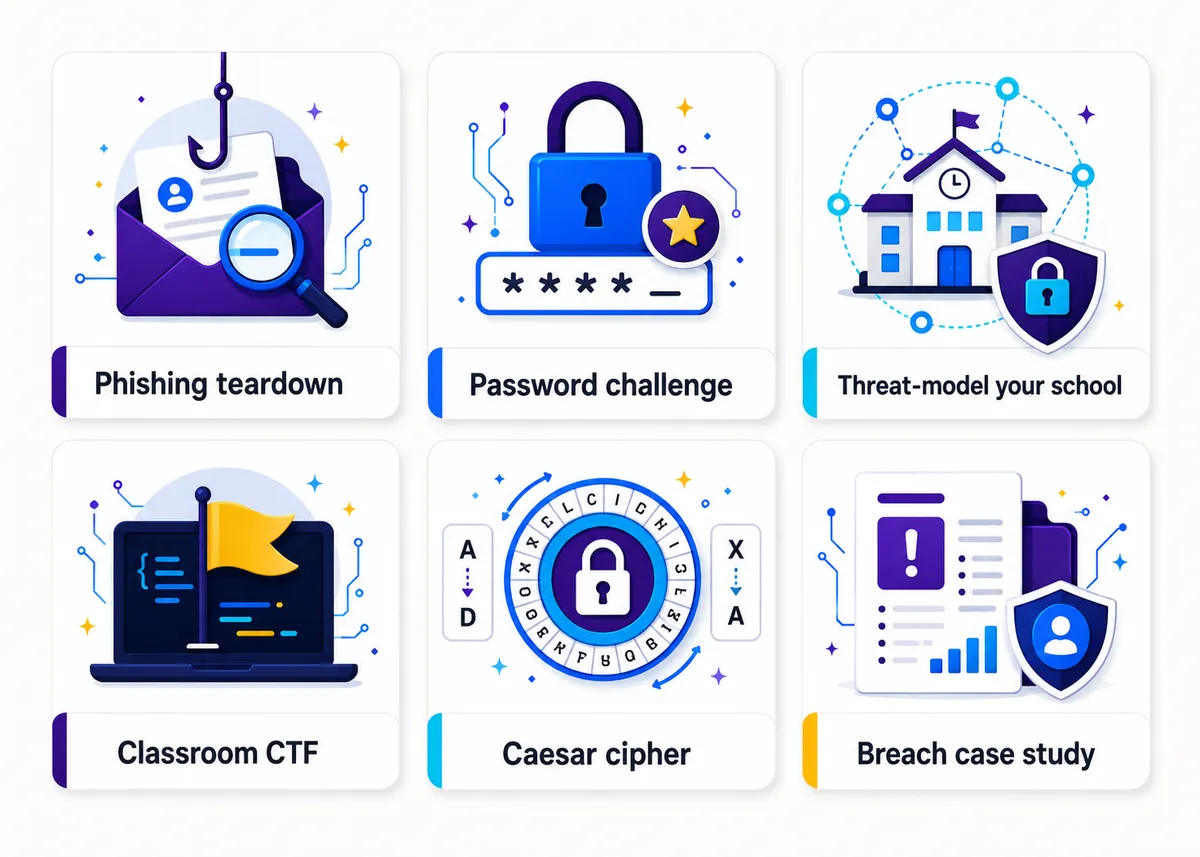
Here are six classroom-ready activities. Most run in a single period, and none need special software.
1. Phishing-email teardown (“spot the red flags”). Hand students a few sample emails (some legit, some fake) and have them mark the warning signs: mismatched sender address, urgency and threats, generic greetings, suspicious links, requests for credentials. Have them hover over a link to reveal the real destination versus the display text. Then flip it: ask them to write a convincing phishing email and trade with a partner to catch each other’s tricks. They learn the attacker’s playbook precisely so they can defend against it. (Best single day-one activity in the subject.)
2. Password-strength challenge. Have students estimate how long different passwords would take to crack, then check against a “time to crack” calculator. The lesson lands fast: length beats complexity, a random four-word passphrase crushes “P@ssw0rd!”, and reusing one password everywhere is the real disaster. Close with them building a personal password strategy (a manager plus unique passphrases) they could use tonight.
3. Threat-model your school. This is the activity that turns kids into defenders. In groups, students map a system they know (the school network, the gradebook, their own phone) and answer four questions: What are we protecting? Who would want it? How could they get in? What would it cost us if they did? Then they propose defenses ranked by effort versus payoff. There are no wrong answers, only weak reasoning, which is exactly the skill you’re building.
4. Social-engineering role-play. Most breaches start with a person, not a computer. Run short scripted scenarios: a “help desk caller” trying to talk a student out of a password, a “delivery driver” tailgating through a locked door, an “IT email” demanding an urgent login. Half the room plays the target, half debriefs the tactic used (urgency, authority, helpfulness). Then build a class list of polite ways to say no and verify. This one sticks because it’s social, not technical.
5. Encryption by hand (the Caesar cipher). Before anyone touches modern crypto, have students encrypt and decrypt messages with a simple letter-shift cipher, then break a classmate’s message using only frequency analysis (the most common letter is probably E). They feel why “secret code” isn’t the same as “secure,” and why real encryption needs keys nobody can guess. Unplugged, a puzzle, and it teaches the core idea behind everything that follows.
6. Data-breach case study. Pick a real, well-documented breach (Target, Equifax, a school district that made the news) and have students reconstruct it: what got in, what data was exposed, what it cost, and the one or two defenses that would have stopped it. End on the tradeoff question: why didn’t the company just do that beforehand? (Usually cost, convenience, or nobody owned the risk.) Students leave understanding that security is a budget-and-priorities fight, not a magic fix.
Here’s a quick way to see what each activity is actually training:
| Activity | Skill it builds | Time |
|---|---|---|
| Phishing teardown | Spotting attacks, attacker mindset | 1 period |
| Password challenge | Personal security habits | 30-45 min |
| Threat-model your school | Defensive reasoning, prioritizing risk | 1 period |
| Social-engineering role-play | The human side of security | 1 period |
| Caesar cipher | Why encryption matters | 1 period |
| Data-breach case study | Tradeoffs and real-world consequence | 1-2 periods |
What is a capture-the-flag (CTF) and how do you run one in class?
A capture-the-flag is a cybersecurity puzzle game. Students solve challenges to find hidden “flags” (short strings of text), and each flag earns points. Despite the name, a beginner CTF is about defense and problem-solving, not breaking into live systems. The puzzles are sandboxed and safe.
For a first classroom CTF, you don’t need a fancy platform. You can build one yourself:
- Cryptography challenges: a Caesar-ciphered message, a Base64 string, a message hidden in a simple substitution. The flag is the decoded text.
- Observation challenges: a flag hidden in a document’s properties, an image filename, or the text of a webpage. Teaches students to look where data actually hides.
- Logic and trivia: a password puzzle, a “which of these is the phishing email” question, a riddle that rewards careful reading.
Run it in pairs, put a leaderboard on the board, and set a hard time limit so nobody spirals on one puzzle. Have hints ready at a small point cost so stuck teams stay in the game. Once you’ve run a homemade one, free hosted beginner CTFs (like picoCTF) give you a ready-made set of leveled challenges with teacher resources, so you don’t have to write every puzzle yourself.
Cybersecurity competitions: CyberPatriot and GenCyber
Two national programs come up constantly, and teachers mix them up, so here’s the accurate version:
- CyberPatriot is the National Youth Cyber Defense Competition, run by the Air & Space Forces Association. Teams are given virtual machines and race to find and fix security vulnerabilities (close ports, patch settings, remove weak accounts) while keeping the systems running. It is purely defensive, runs as an after-school or club commitment with a real season, and is a great structured way to extend strong students past your curriculum.
- GenCyber is a program (supported by the National Security Agency, and historically the National Science Foundation) that funds free cybersecurity summer camps for students and teachers. It is not a competition. Its goal is to grow interest and teach sound cybersecurity principles, and the teacher camps are a genuinely good (free) professional-development route if you got handed this course out of field.
In short: CyberPatriot is a defense competition your students join; GenCyber is free camps and training (some for you). Both are worth pointing your most interested kids (and yourself) toward.
Free activities and tools
You can teach a full semester of this without buying anything. Some reliable, no-cost starting points:
- CISA and other government resources publish free phishing examples and security-awareness material you can drop straight into a teardown.
- picoCTF gives you a free, beginner-friendly capture-the-flag with leveled challenges and teacher guides.
- CyberPatriot’s training materials are free even if you never enter the competition.
- Common Sense Education and similar libraries cover the digital-safety and privacy side for the less technical units.
- Password-strength estimators and “time to crack” calculators are free in the browser and make the password challenge run itself.
Pair these with a couple of done-for-you handouts and you’ve got a unit. Our Free Library has no-prep tech activities (bell ringers, a project rubric, first-week openers) that slot in alongside these tools, so you can test the style before committing to anything.
Frequently asked questions
Do students need to know how to code to do cybersecurity activities? No. Every activity here runs on reasoning, not programming. Phishing teardowns, threat-modeling, ciphers, and CTF puzzles are all about thinking like a defender, which is the right place to start anyway. Coding can come later.
Isn’t teaching this risky? Am I teaching kids to hack? No, and that’s the whole design. Good cybersecurity education centers defense: spotting attacks, protecting systems, and weighing risk. Students reason about how an attack works so they can stop it, never against a real target. It’s the same reason we teach firefighters how fire spreads.
What’s the difference between CyberPatriot and GenCyber? CyberPatriot is a national youth cyber-defense competition (run by the Air & Space Forces Association) where teams find and fix vulnerabilities. GenCyber is an NSA-supported program of free summer camps for students and teachers, not a competition. One is a contest you join; the other is free training.
How do I run a capture-the-flag without any special software? Build your own puzzle set: ciphered messages, flags hidden in file properties or webpages, and security trivia. Run it in pairs with a leaderboard and timed hints. Once that works, free hosted platforms like picoCTF give you ready-made leveled challenges.
What’s a good first-day cybersecurity activity for beginners? The phishing-email teardown. Students mark the red flags (mismatched sender, urgency, suspicious links) on a mix of real and fake emails, then write a convincing fake to trade with a partner. It needs no software, lands in one period, and sets up the defender mindset the rest of the unit builds on. For the full scope and sequence, see how to teach high school technology.
Want this built into a full unit instead of assembled piece by piece? The Introduction to Security unit of our editable AP Cybersecurity curriculum opens with the same defender-first moves you just read, phishing teardown included, and every unit after it keeps students reasoning about risk and defense. If you’d rather test the style first, the no-prep openers in the Free Library let you try it before committing. For the wider tech picture, start with How to Teach High School Technology, and for the neighboring subject, AI Literacy Activities for High School Students runs the same playbook for AI.
AP® is a trademark registered by the College Board, which is not affiliated with, and does not endorse, this product.